
Appearance
Discounts
Menu: Commerce -> Discounts
Deep link:/_Admin/commerce/discounts?SiteId={siteGuid}
Create:/_Admin/commerce/discounts/create?SiteId=...
Edit:/_Admin/commerce/discounts/edit?SiteId=...&id={discountId}
Configure site discount rules: can apply automatically when conditions are met, or via discount codes entered by customers/admin in carts. Cart and checkout trial calculation uses the server discount engine; script API: k.commerce.discount.
How to Open
- In the Edit menu, enable Commerce -> Discounts (and the parent Commerce group).
- Open Commerce -> Discounts in the left sidebar.
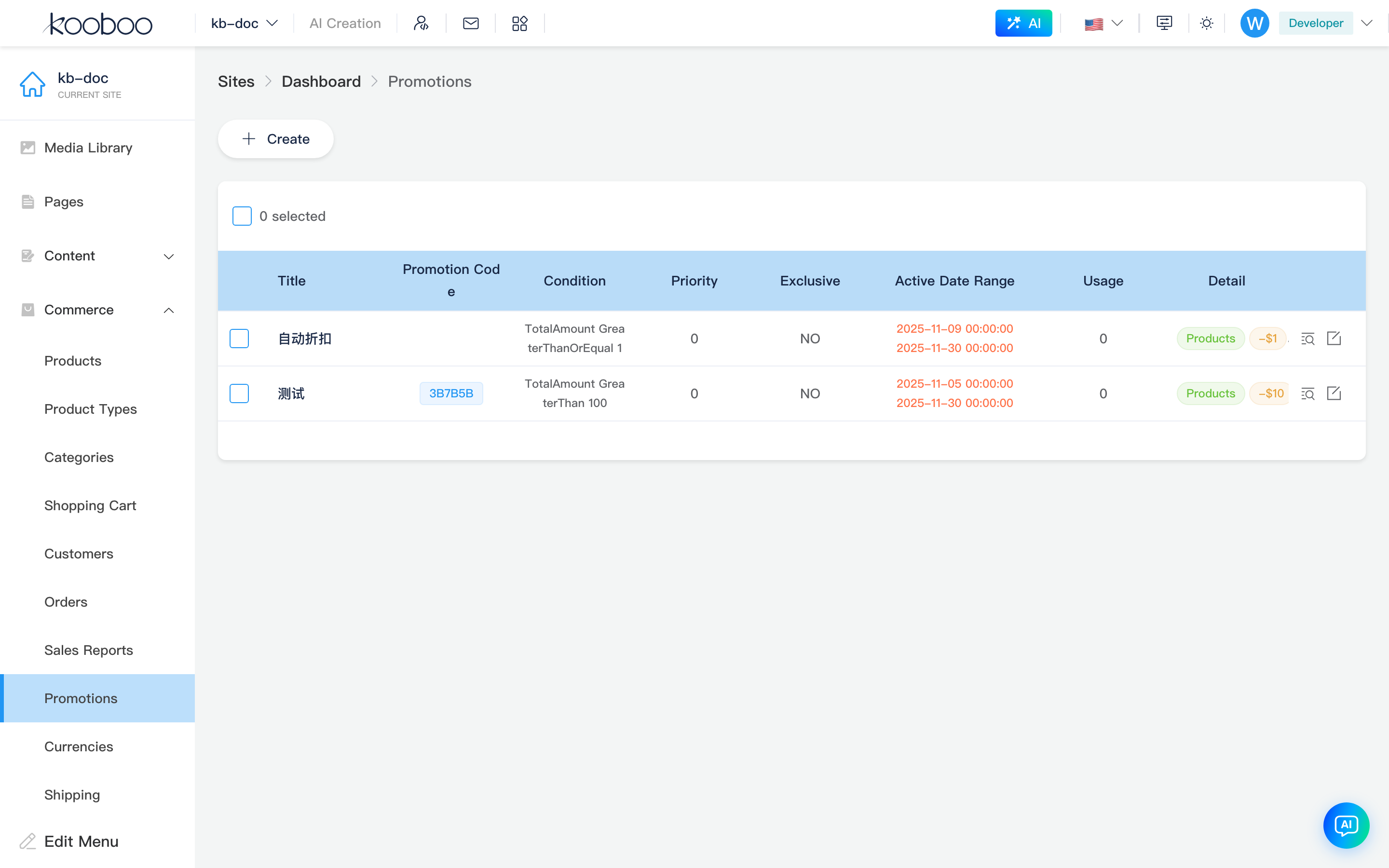
List Page
Path: /_Admin/commerce/discounts?SiteId=...
| Column / Action | Description |
|---|---|
| Title | Rule name (title) |
| Discount code | When method is discount code, shows code as tag; empty for automatic discounts |
| Conditions | Multiple condition summaries joined by AND / OR |
| Priority | Number priority; sort order when multiple rules match |
| Exclusive | Yes means exclusive with other discounts (isExclusion) |
| Active period | Start ~ end; not started / active / expired shown in color |
| Usage | Discount code usage count; if capped, shows used/limit |
| Details | Tags: Product / Order / Free shipping, plus -amount or -percentage |
| Create | Opens Create and edit |
| Discounted orders | Row search icon opens Discounted orders dialog |
| Edit | Row pencil opens edit page |
| Batch delete | Select rows → Delete → confirm |
Discounted Orders Dialog
Click Discounted orders (advanced search icon) on a list row to open a paginated dialog of orders that applied this rule:
| Column | Description |
|---|---|
| Order ID | Order Id |
| Total amount | Original/current price (CurrencyAmount) |
| Order status | Status component |
| Customer | Email, phone |
| Created | Order time |

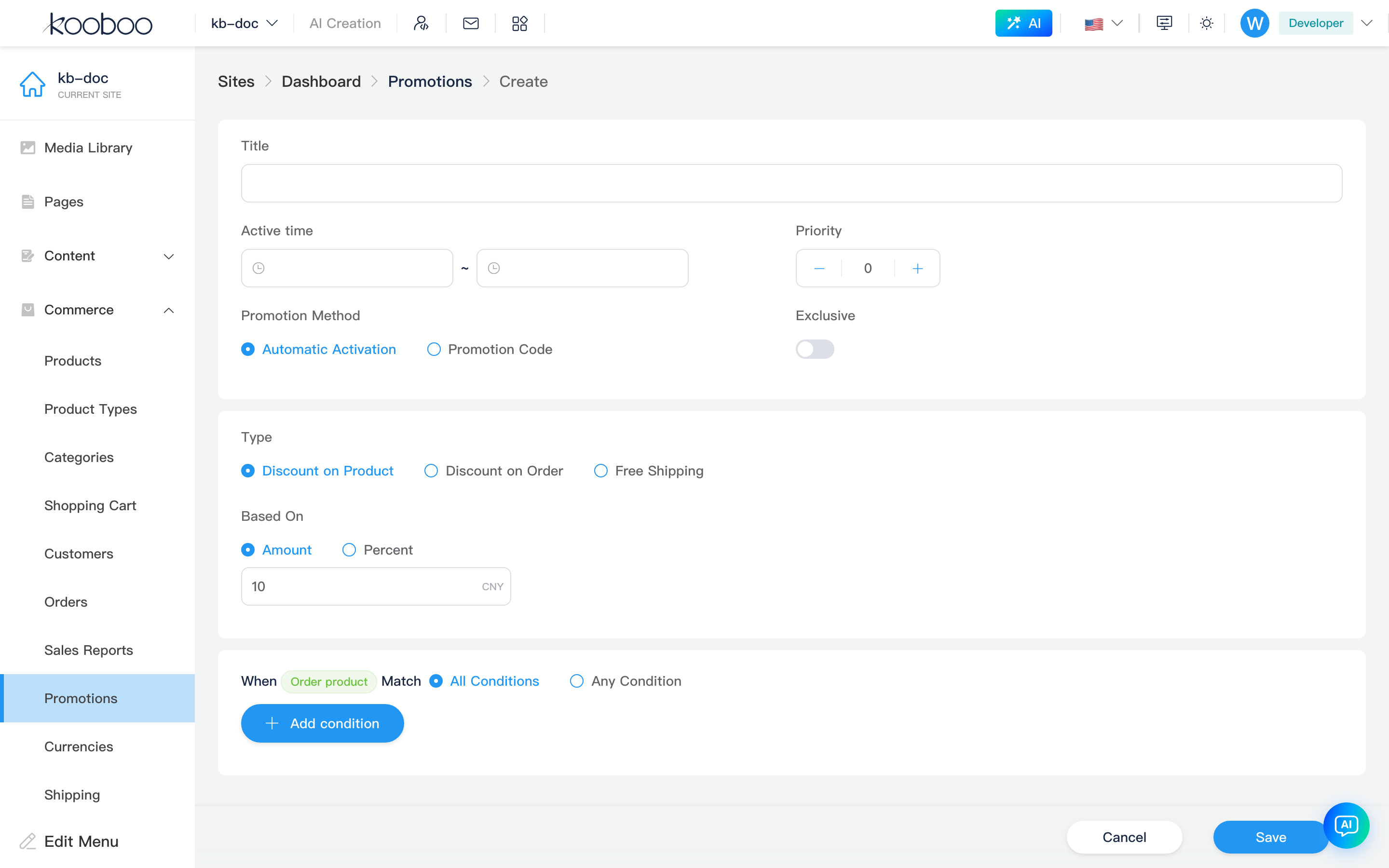
Create and Edit
Path: /_Admin/commerce/discounts/create?SiteId=... or .../edit?SiteId=...&id=...
Breadcrumb: Discounts -> Create / Edit. Form has three card sections.
Basic Information
| Field | Description |
|---|---|
| Title | Rule name for list and admin identification |
| Active period | Start and end date/time; rule inactive outside range |
| Priority | Integer; sort when multiple rules match |
| Method | Automatic discount: applies when conditions met; Discount code: requires code entry (below) |
| Discount code | Shown only for discount code method: code text (create page can auto-generate 6 uppercase chars), optional usage limit and cap |
| Exclusive | When enabled, exclusive with other discounts (isExclusion) |
Discount codes below the cart product table can only use saved rules with discount code method here.
Discount Type and Amount
| Type | Description |
|---|---|
Product amount off (ProductAmountOff) | Reduces qualifying order lines; condition schema is "order product" dimension |
Order amount off (OrderAmountOff) | Reduces entire order; condition schema is "order" dimension |
Free shipping (FreeShipping) | Waives shipping; no amount/percentage |
When not free shipping, choose fixed amount or percentage and enter value (suffix is site currencyCode or %).
Changing type clears existing conditions and reloads the corresponding condition field list.
Applicable Conditions
Uses the shared Condition component:
| Item | Description |
|---|---|
| Match | All conditions (AND) or Any condition (OR) |
| Condition rows | Field (dropdown, varies by type) + comparison + value; Add / Delete rows |
For example: minimum order amount, specific products/categories, customer tags, etc. (available fields from server getOrderLineSchemas / getOrderSchemas).
Related
- Carts — enter discount codes during trial calculation
- Orders — view discounted orders after purchase
- Product management, Product categories — conditions often reference product scope
- k.commerce.discount