
Appearance
IndexedDB Tables
Menu: Database → IndexedDB Tables
Deep link:/_Admin/database/table?SiteId={siteGuid}
IndexedDB tables are the site’s built-in dynamic table storage: after defining table names and fields (columns) in the admin, you maintain data on this page and read/write in KScript through k.DB.indexedDb.{tableName}. Data is isolated per site; no separate connection string is required.
Permissions
List and browse data: database (view). Create table, change columns, and create/update/delete data require database·edit; multi-select delete of tables or rows requires database·delete.
Difference from SQLite / MySQL menus
| IndexedDB tables | SQLite tables, etc. | |
|---|---|---|
| Storage | Site IndexedDB dynamic tables | Site SQLite file or external database connections |
| Create table | Enter table name in admin | SQLite works out of the box; MySQL/SQL Server require connection setup first |
| Change schema | Maintain fields on Column settings page | Mostly existing physical tables; capabilities depend on the UI |
| Script | k.DB.indexedDb.tableName | k.DB.sqlite, etc. |
See Database overview.
How to Open
- In Edit Menu, check Database → IndexedDB Tables.
- Open Database → IndexedDB Tables in the left sidebar.
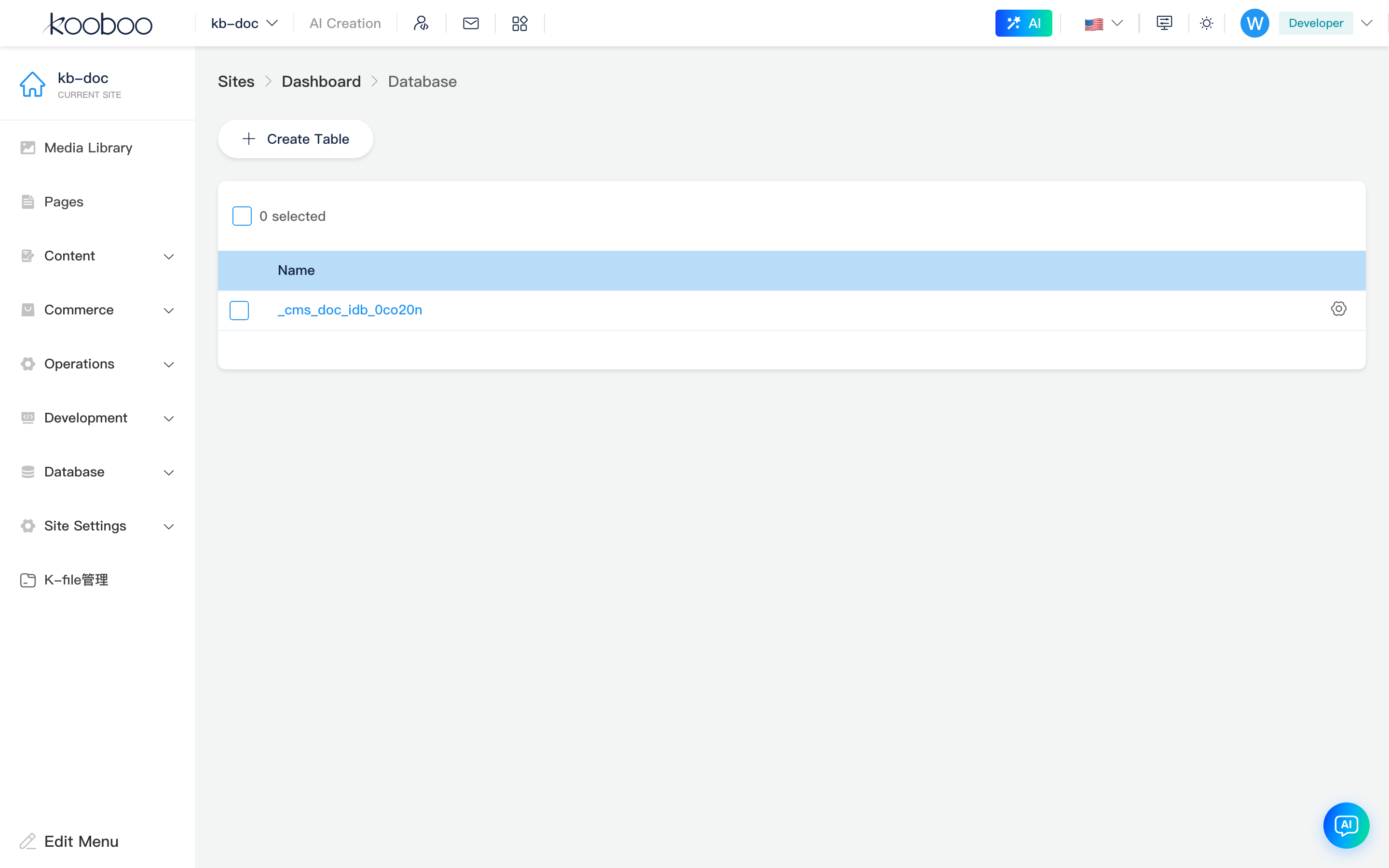
Table List
Toolbar
| Button | Permission | Description |
|---|---|---|
| Create table | database·edit | Opens the create table dialog |

List
| Column / action | Description |
|---|---|
| Name | Click the table name to open table data |
| Row Settings (gear) | Opens column settings |
| Multi-select Delete | Deletes the entire table and its data (database·delete) |
System internal table names starting with _sys_ or _koobootemp are not shown in the list.

Create table dialog
| Field | Rule |
|---|---|
| Table name | Required; 1–50 characters; must start with a letter or digit; letters and digits only; unique within the site |
After confirmation, the table definition is registered. You can open Column settings to add fields, or click the table name to maintain data directly (empty tables can receive data first; columns take effect when Column settings is saved).
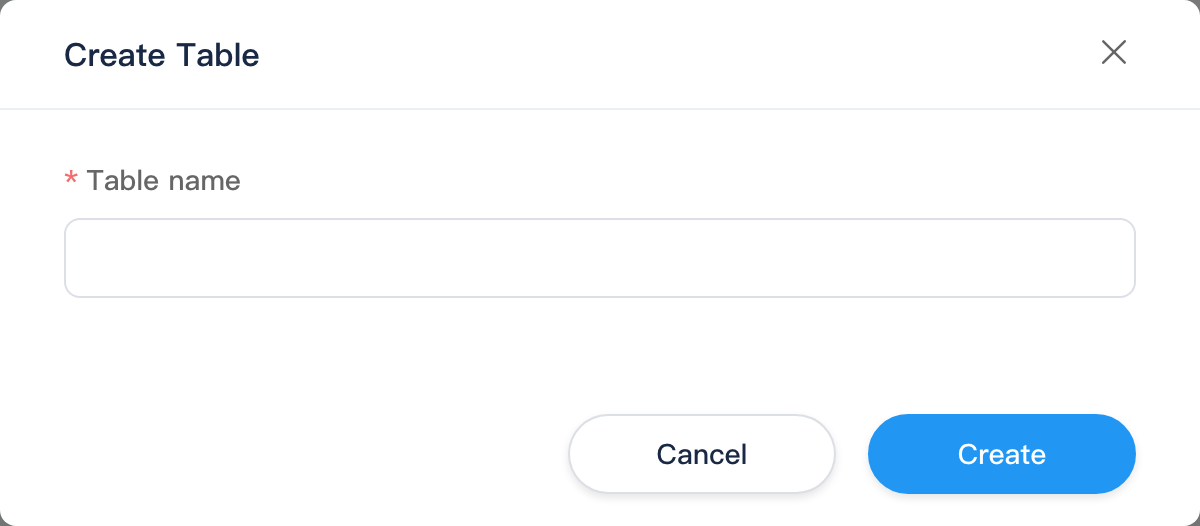
Column Settings
Route: /_Admin/database/table/columns?SiteId=...&table={tableName}
Enter from list Settings, or from Settings on the Table data toolbar. The page header shows the current table name.
Toolbar
| Button | Description |
|---|---|
| New column | Opens the column editor dialog |
Column list
| Column | Description |
|---|---|
| Column name | Field name |
| Control type | See table below |
| Primary key / Unique | Shown only for IndexedDB tables |
| Index | Whether an index is created (primary key columns are treated as indexed) |
| Edit / Delete | Change column definition; remove column from list (effective after save) |
Bottom Save / Cancel: Save writes the full column definition back to the site; unsaved changes prompt before leaving. Internal fields _id (primary key) and _version are not shown in the list.
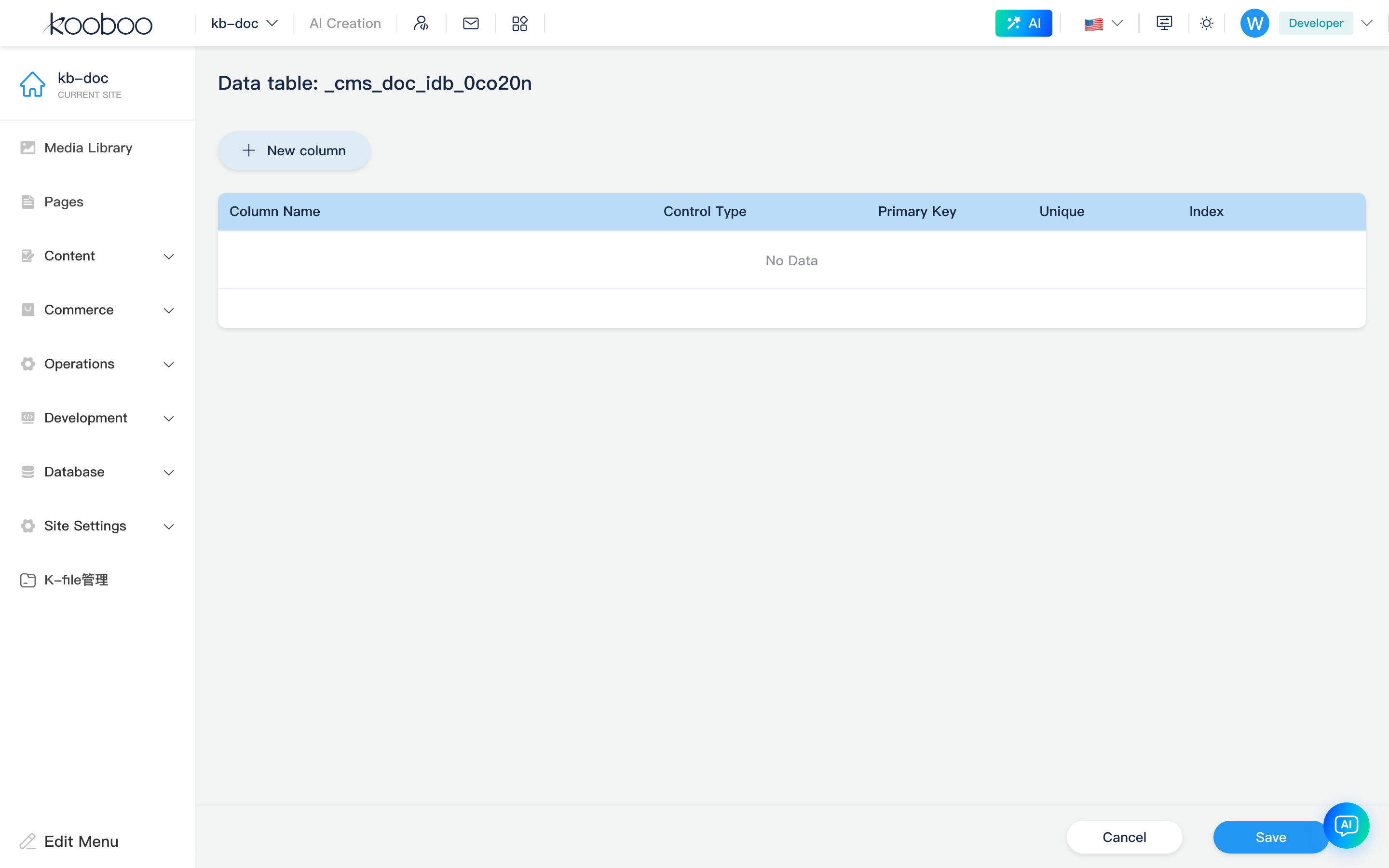
Column editor dialog
| Field | Description |
|---|---|
| Name | Required when creating; cannot be renamed after save |
| Control type | Determines data type and input control (see below) |
| Length | Max length for text controls |
| Options | Select / checkbox / radio require display name and value |
| Auto-increment | Number type only: increments by seed and step; not editable on the data edit page |
| Primary key | Business primary key marker (coexists with system _id; use per table design) |
| Unique | Column values must be unique |
| Index | Query index |
| Control type (UI) | Typical use |
|---|---|
| Text box | Short text |
| Textarea | Long text |
| Rich text | HTML content |
| Select / checkbox / radio | Enumerated options |
| Boolean | Yes/no |
| Date-time | Date and time |
| Number | Numeric values; can auto-increment |
Table Data
Route: /_Admin/database/table/data?SiteId=...&table={tableName}
Click a table name in the list to open.
Toolbar
| Button | Permission | Description |
|---|---|---|
| New data | database·edit | Opens edit data (create) |
| Export data | database (view) | Exports current filter/sort data as CSV |
| Settings | — | Jump to Column settings |
No CSV import
The IndexedDB tables data page does not provide an Import data button (that feature is on SQLite / MySQL / SQL Server table menus). For bulk writes use script k.DB.indexedDb or custom import logic.

Data table
- Columns: business fields except
_idand_version; headers support sorting (sort state is saved locally in the browser). - Pagination: default 30 rows per page; page through results.
- Row Edit: opens edit data.
- Multi-select Delete: deletes rows by primary key (
database·delete).
Date-time columns are formatted as local time in the list.

Edit Data
Route: /_Admin/database/table/edit-data?SiteId=...&table={tableName} (no id when creating; id when editing)
Form fields are rendered by control type from Column settings: text, rich text, options, boolean, date-time, number, etc. Auto-increment fields show the current value only and cannot be edited.
Save returns to the Table data list; Cancel discards and returns.
Script access (development)
In Code / module server-side scripts, access tables as properties of k.DB.indexedDb, for example:
typescript
const row = k.DB.indexedDb.orders.find("orderNo", "A1001")
k.DB.indexedDb.orders.add({ orderNo: "A1002", amount: 99 })
Chained APIs (find / findAll / add / update / delete / pagination, etc.) are documented in k.DB.indexedDb. Column and data changes made in the admin use the same tables as scripts.
SQL logs
IndexedDB operations are not written to SQL logs. Only SQL from k.DB.sqlite / MySQL / SQL Server appears in SQL logs when site SQL logging is enabled.
Typical workflow
- Create table with a valid table name.
- Open Settings, New column, and Save the column definition.
- Click the table name, New data to enter records, or write via script.
- For multi-table associations, configure IndexedDB table relations.
- For troubleshooting or auditing, see SQL logs.
Related
| Doc | Description |
|---|---|
| Database overview | Submenus and routes |
| IndexedDB table relations | Table associations |
| k.DB.indexedDb | Full script API |
| Development · Code | Writing Code that calls tables |