
Appearance
Labels
Menu: Content → Labels (admin UI may show “Labels”)
Deep link:/_Admin/content/labels?SiteId={siteGuid}
Labels centralize multilingual copy for the site (buttons, hints, fixed paragraphs), avoiding hardcoding in pages/Views. Templates and KScript use k.label(), k.t() for the current language; see k.label API. For standalone SPA using /_spa/lang/{lang} dictionaries, see SPA multilingual.
Prerequisite: enable multilingual
Configure site languages under Site settings → Basic (e.g. zh, en), path about /_Admin/system/settings?SiteId=.... Without multilingual, the edit dialog usually shows one Value field. Setup also in k.label API · Prerequisites.
How to Open
- Enter the site admin (address bar includes
SiteId). - Open Content → Labels in the left sidebar.
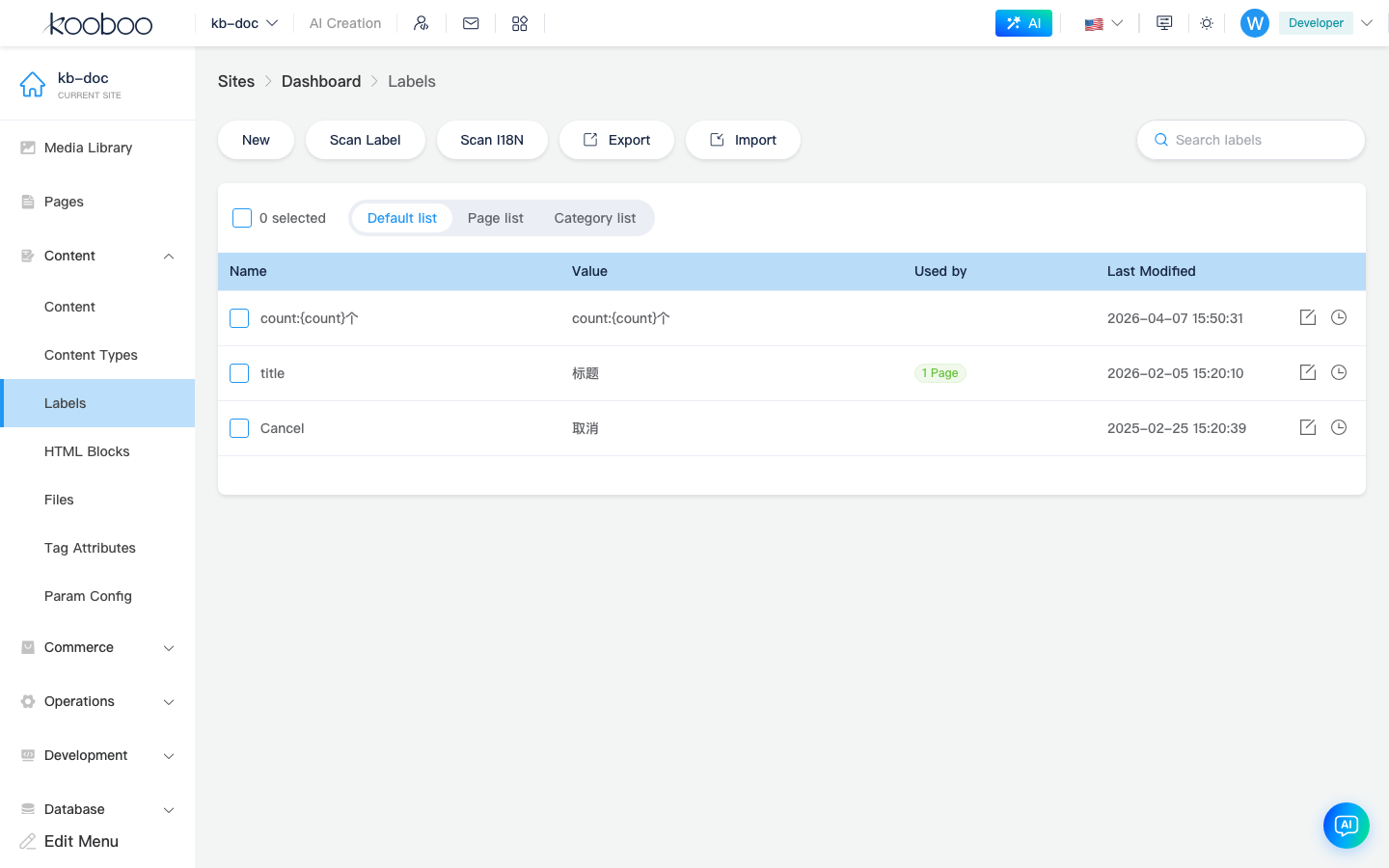
List Views
Three list modes above the table (radio group):
| Mode | Description |
|---|---|
| Default list | Flat list of all labels; References column (used by Page / View / Layout, etc.) |
| Page list | Grouped by page, labels under each page |
| Category list | Group by resource type (page / view / layout, etc.), then expand per resource |
| Column / action | Description |
|---|---|
| Name | Label key; cannot change after create (read-only when editing); English identifiers recommended, e.g. Cancel, footer_copyright |
| Value | Summary for default language (full per-language values in edit dialog) |
| References | Default list only: reference relationships, click to view |
| Last modified | Update time |
| Edit | Opens edit dialog |
| Version | Version history for the label (when site log permissions allow) |
Supports search (filter by name or any language value), pagination, multi-select batch delete (permission label · delete).
Toolbar
| Button | Description |
|---|---|
| New | Open edit dialog; enter name and per-language values |
| Scan labels | Scan site resources for copy attributes not yet in the database; check and Add labels (see scan results) |
| Scan I18N | Scan multilingual-related pending items; check and Update existing labels (per scan results) |
| Export | Export label data (backup or migration) |
| Import | Import labels from .json file |
Create and Edit
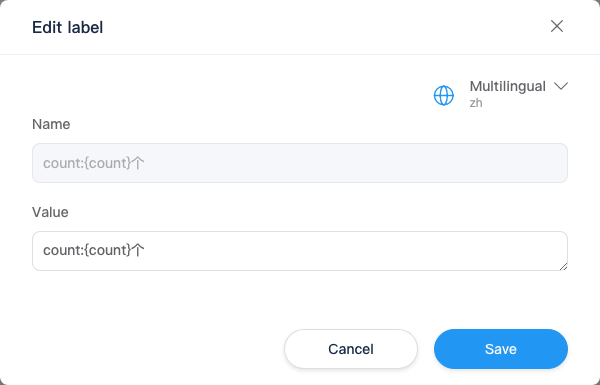
Dialog title New label or Edit label.
| Field | Description |
|---|---|
| Name | Fill when creating; key for k.label("name"); cannot rename after save |
Value · {language} | One row per enabled language; default language row marked “Default” |
| Language switcher | Top-right language selector switches editing focus (fields still listed per language) |
Bottom Create / Save, Cancel.
Scan Labels and Scan I18N
Both scans open a Results dialog with columns: Type, Display name, Attribute, Key (editable suggested key), Value (scanned original text).
| Scan type | Confirm button | Effect |
|---|---|---|
| Scan labels | Add labels | Create selected items as new labels |
| Scan I18N | Update | Update existing label multilingual content per scan |
Tip text: selected attributes become labels for unified maintenance (scanLabelTips).
Import
Import dialog: select .json file and confirm upload. Format must match export; Export backup before import.
Difference from k.content
| Labels | Content (content folders) | |
|---|---|---|
| Purpose | UI copy, short phrases, reusable fixed text | Structured business data (articles, product descriptions, etc.) |
| Admin | Content → Labels | Content → Content |
| API | k.label() / k.t() | k.content.{folder}.… |
| Model | Key + string per language | Fields defined by content types |
Usage in Templates and Scripts
typescript
// Copy for current site language
k.label('Cancel')
k.t('Welcome {name}', { name: '张三' })
More parameters, k.site.labels.all(), etc.: k.label API.
Related
| Doc | Description |
|---|---|
| Content overview | Content group menu |
| k.label API | Multilingual setup, k.label / k.t |
| Site admin menu overview | Full menu (includes Element attributes, etc.) |
“Labels” vs “Element attributes”
Content → Labels (/content/labels) manages Label multilingual copy. Content → Element attributes (/content/text) manages HTML attributes for k-config in templates; see Element attributes.