
Appearance
Site Admin Menu Overview
Organized by the Kooboo site-admin left sidebar. UI labels follow the language of your logged-in admin.
Complete outer steps first
If you are still on My Sites (/_Admin/), read Login and site list first, click Manage on a site, then use the menus below.
Account Level (No SiteId)
| Page | Path |
|---|---|
| My Sites | / |
| Login | /login |
| Create Site | /create |
| Import Site | /create/import |
| Clone Site | /create/clone |
| List inside folder | /?currentFolder={folderName} |
See Login and site list and Create a site.
Site-Level Deep Link Format
text
/_Admin{routePath}?SiteId={siteGuid}Replace {siteGuid} with the SiteId in the address bar. Paths in the tables below are relative to /_Admin (and require SiteId).
Top Bar and Common Entry Points
| Entry | Path | Notes |
|---|---|---|
| Dashboard (home) | /site | Site overview; see Dashboard |
| Media Library | /site/media | Images and media; see Media Library |
| Pages | /site/pages | Page list and editing; see Pages |
Content
Left sidebar group: Content (some items appear only after you enable them in Edit Menu)
| Menu | Path | Notes |
|---|---|---|
| Content | /content/contents | Content folders and entries; maps to k.content.{folderName} |
| Content Types | /content/contentTypes | Field models; create before content folders |
| Labels | /content/labels | Multilingual copy; maps to k.label / k.t |
| HTML Blocks | /content/htmlblocks | Reusable HTML blocks; see HTML Blocks |
| Files | /content/files | CMS file library; see Files |
| Tag Attributes | /content/text | Template k-config; see Tag Attributes |
| Param Config | /content/useroptions | Structured site parameters; see Param Config |
Related docs: Content overview · Content types · Content list · Labels · HTML Blocks · Files · Tag Attributes · Param Config
Commerce
Left sidebar group: Commerce (advanced)
| Menu | Path | Docs |
|---|---|---|
| Product Management | /commerce/product-management | List · Detail |
| Product Types | /commerce/product-types | Product Types |
| Product Categories | /commerce/product-categories | Product Categories |
| Carts | /commerce/carts | Carts |
| Customers | /commerce/customers | Customers |
| Orders | /commerce/orders | Orders |
| Sale Stats | /commerce/sale-stats | Sale Stats |
| Discounts | /commerce/discounts | Discounts |
| Currencies | /commerce/currencies | Currencies |
| Shipping | /commerce/shippings | Shipping |
| Loyalty | /commerce/loyalty | Loyalty |
| Taxes | /commerce/taxes | Taxes |
| Notification | /commerce/notification | Notification |
| Settings | /commerce/settings | Settings |
Overview: Commerce · Dev reference: k.commerce
Operations Center
Left sidebar group: Operations Center (route prefix /system, different group from Site Settings)
| Menu | Path | Docs |
|---|---|---|
| Visitor Logs | /system/visitor-logs | Visitor Logs |
| Behavior Analysis | /system/user-behavior-analysis | No dedicated page yet |
| Resource Guardian | /system/resource-guardian | Resource Guardian |
| Page Interaction | /system/page-interaction | Page Interaction |
| AB Testing | /system/ab-testing | AB Testing |
| Error Monitoring | /system/error-monitoring | No dedicated page yet |
| Site Logs | /system/site-logs | Site Logs |
| Sync | /system/sync | Sync |
| Search | /system/search | No dedicated page yet |
| Automation | /system/automation | No dedicated page yet |
| AI Service | /system/ai-service | AI Service |
Overview: Operations Center
Development
Left sidebar group: Development (advanced)
| Menu | Path | Docs |
|---|---|---|
| Views | /development/views | Views |
| Layouts | /development/layouts | Layouts |
| Scripts | /development/scripts | Scripts |
| Styles | /development/styles | Styles |
| Code | /development/code | Code |
| Code Log | /development/code-log | Code Log |
| Code Search | /development/code-search | Code Search |
| URL | /development/urls | URL |
| Forms | /development/forms | Forms |
| Menus | /development/menus | Menus |
| Authentication | /development/authentication | Authentication |
| Open API | /development/openapis | Open API |
| SPA Multilingual | /development/spamultilingual | SPA Multilingual |
| Modules | /development/modules | Modules |
| Scheduled Jobs | /development/jobs | Scheduled Jobs |
Overview: Development (includes Template Engine / API cross-reference)
Module-injected sidebar menus
Published modules can configure menu in module.config to attach custom entries under a top-level group. Set parent to that group's menu.name in routing (e.g. content, commerce, development, system, database). See Modules · Mount site admin menu.
Page designer routes (no left-menu item): /page/edit, /page/design, etc. Open from Pages list.
Database
Left sidebar group: Database (advanced)
| Menu | Path | Docs |
|---|---|---|
| IndexedDB Table | /database/table | IndexedDB Table |
| IndexedDB Relations | /database/table-relation | Table Relations |
| Key-Value | /database/key-value | Key-Value |
| SQLite Table | /database/sqlite-table | SQLite Table |
| MySQL Table | /database/mysql-table | MySQL Table |
| SQL Server Table | /database/sqlserver-table | SQL Server Table |
| SQL Logs | /database/sql-logs | SQL Logs |
Overview: Database · Dev reference: k.DB · k.DB.sqlite
Site Settings
Left sidebar group: Site Settings (also /system prefix, different menu group from Operations Center)
| Menu | Path | Docs |
|---|---|---|
| Basic Settings | /system/settings | Basic Settings |
| Domains | /system/domains | Domains |
| Integrations | /system/config | Integrations |
| Site Users | /system/siteuser | Site Users |
| Roles | /system/roles | Roles |
| Request Hooks | /system/front-events | Request Hooks |
| Action Hooks | /system/backend-events | Action Hooks |
| Cookie | /system/cookie | Cookie |
| AI Service | /system/ai-service | AI Service |
Overview: Site Settings · Integration deep link example: /_Admin/system/config?SiteId=...&group=Payment
Standalone Features (Not in Main Left Menu)
| Feature | Path |
|---|---|
| AI App Builder | /ai-app-builder |
| AI Chat | /ai-chat/overview |
Permissions and Edit Menu
- Whether a submenu appears also depends on site role and feature permissions (
meta.menu.permission). - Routes marked
advanced: true(e.g. Files, HTML Blocks, Tag Attributes) are hidden from the left sidebar by default; enable them in Edit Menu.
How to Open Edit Menu
- Open any site-admin page (e.g. Dashboard).
- Click Edit Menu at the bottom of the left sidebar (pencil icon,
editMenu). - In the panel, check or uncheck items under each group; the hint says to hide infrequently used menus.
- After closing the panel, the left sidebar updates immediately.
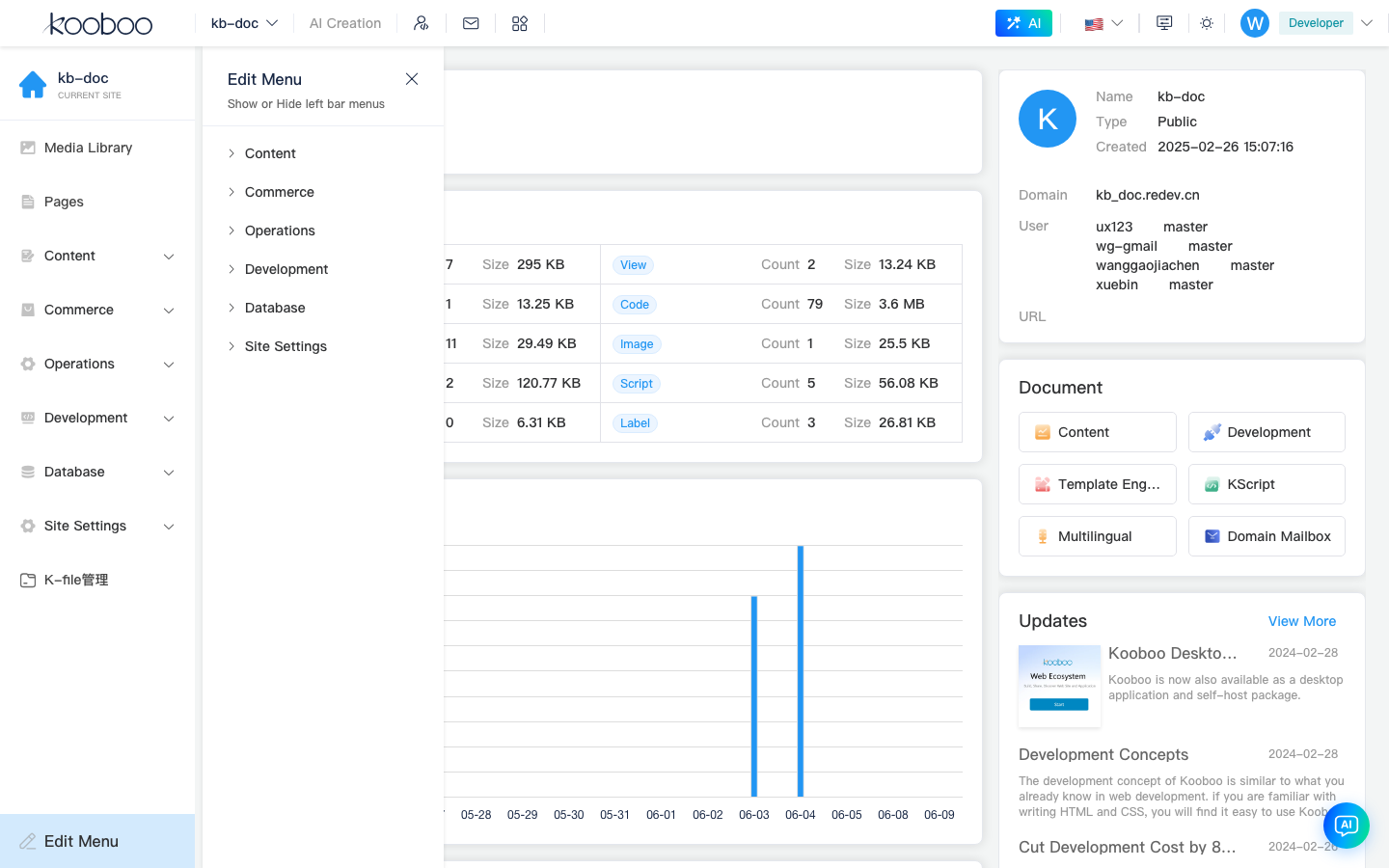
After enabling Content → Files, HTML Blocks, etc., the matching entries appear under Content; see each sub-doc for details.