
Appearance
Action Hooks
Menu: Settings -> Action Hooks (advanced menu) List:
/_Admin/system/backend-events?SiteId={siteGuid}Edit:/_Admin/system/backend-events/edit?SiteId={siteGuid}&name={eventName}&display={displayName}
Action Hooks fire rules before and after backend resource operations such as create, update, and delete, for auditing, synchronization, notifications, or business validation before a resource is saved. They map to server-side BackendRule + BackendEvent. Rules run only when the site-level enableBackendEvents switch is on.
Permissions
| Action | Permission |
|---|---|
| View the hook list and edit page | backendEvents |
| Toggle Hook On / Off in the top-right | site·edit (saves site field enableBackendEvents) |
| New Hook, edit rules, and Save | backendEvents·edit |
| Multi-select Delete all rules under an event | backendEvents·edit |
In the current UI, New Hook and Save on the edit page still check frontEvents·edit; verify that permission when assigning roles.
Master switch
Besides Hook On on this page, Action Hooks (enableBackendEvents) in Basic Settings · Advanced must be on. Both controls edit the same site field; if either is off, no action hooks run.
Distinction from Request Hooks
| Request Hooks | Action Hooks (this page) | |
|---|---|---|
| When they run | Front-end HTTP requests (Route / Page / View) | Backend resource operations (create / update / delete, etc.) |
| Path | /system/front-events | /system/backend-events |
| Rule resource | BusinessRule | BackendRule |
| Master switch | enableFrontEvents | enableBackendEvents |
How to Open
- In Edit Menu, enable Settings -> Action Hooks.
- Open Settings -> Action Hooks in the left sidebar.
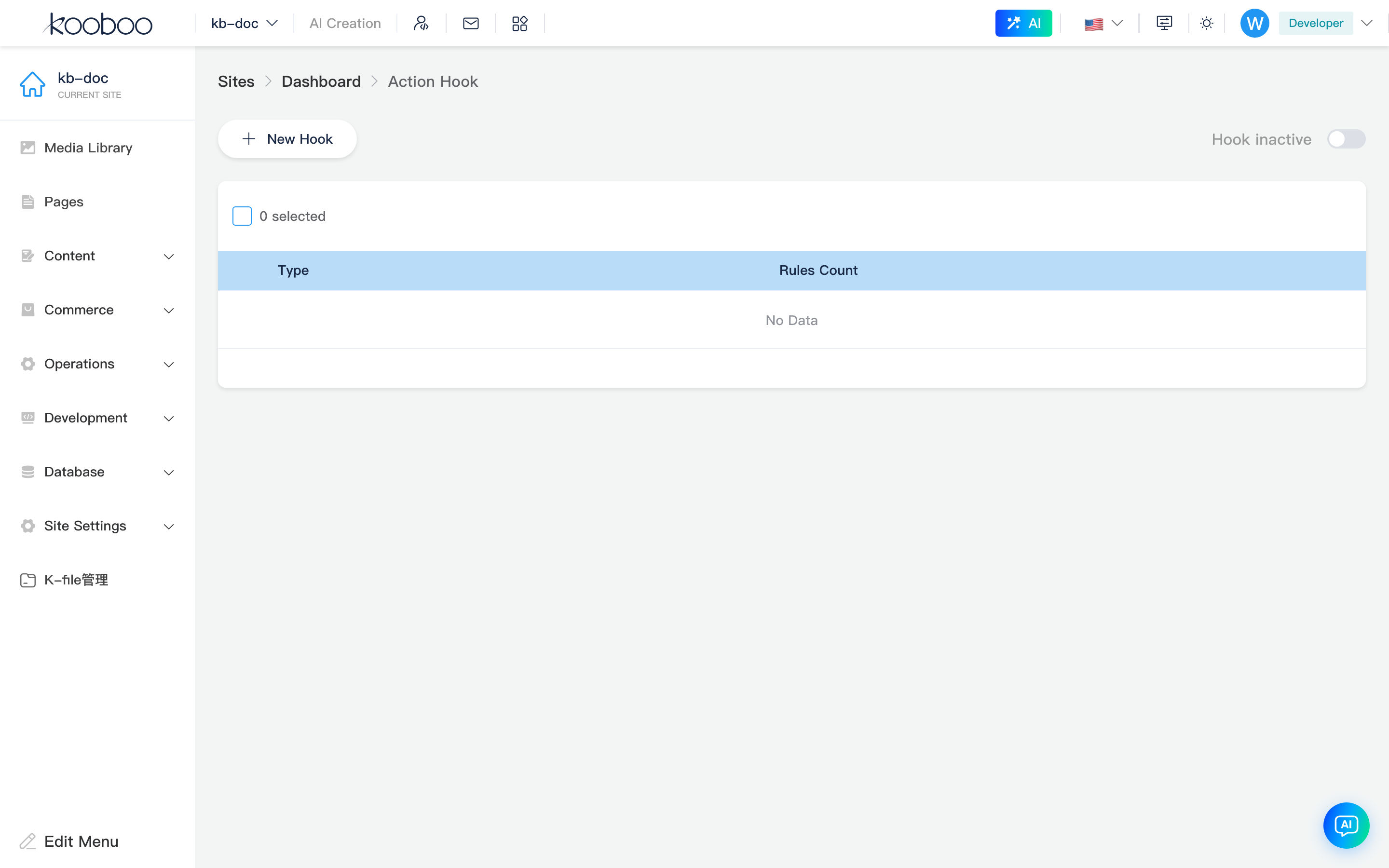
Toolbar
| Control | Description |
|---|---|
| New Hook | Opens hook type picker (event types already configured are hidden) |
| Hook On / Off | enableBackendEvents; toggling saves the site immediately (saveSite) |
| Status text | When on, shows “Hook On” (blue); when off, gray “Hook Off” |

Hook List
| Column | Description |
|---|---|
| Type | Localized display of event name (e.g. PageCreated → “Page created”; wording follows login language) |
| Rule count | Number of saved rules for that event |
| Edit | Opens rule edit page |
Multi-select Delete removes all rules for the selected event types (BackendRule/DeleteEvents), not individual rules.

New Hook
Click New Hook to open the Hook list, grouped by resource category. Click a type to open the edit page (the row may not appear until rules are saved).
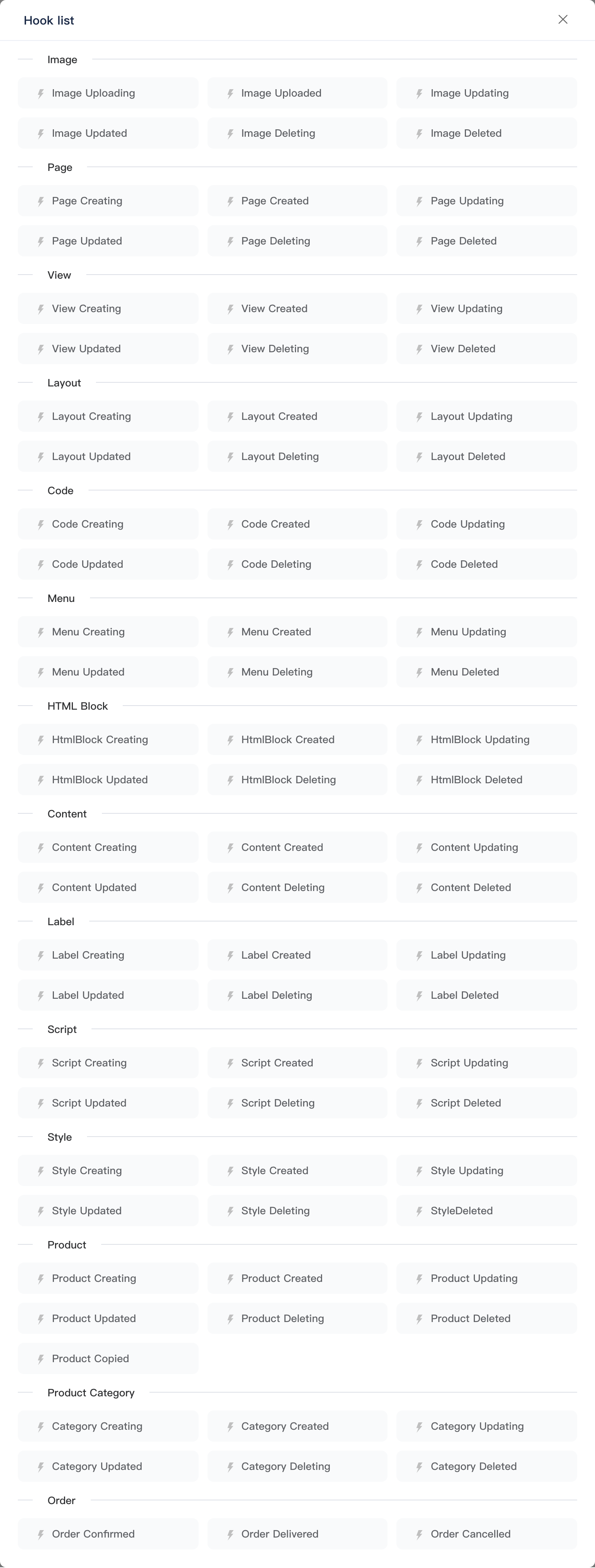
Available Event Types
The hook list is grouped by resource. Display names are localized via server Hardcoded; use BackendRule/EventList as the source of truth.
Image Events
| Timing | Event name (name) |
|---|---|
| Before / after upload | ImageUploading / ImageUpload |
| Before / after update | ImageUpdating / ImageUpdated |
| Before / after delete | ImageDeleting / ImageDelete |
General Resource Events
Each resource follows resource prefix + timing suffix, e.g. PageCreating, ContentUpdated.
| Backend group | name prefix |
|---|---|
| Page | Page |
| View | View |
| Layout | Layout |
| Code | Code |
| Menu | Menu |
| HTML block | HtmlBlock |
| Content | Content |
| Label | Label |
| Script | Script |
| Style | Style |
| Operation timing | name suffix | Example |
|---|---|---|
| Before / after create | Creating / Created | PageCreating / PageCreated |
| Before / after update | Updating / Updated | ContentUpdating / ContentUpdated |
| Before / after delete | Deleting / Deleted | ScriptDeleting / ScriptDeleted |
Commerce Events
| Backend group | Event name (name) | Typical timing |
|---|---|---|
| Product | ProductCreating / ProductCreated | Before / after product create |
| Product | ProductUpdating / ProductUpdated | Before / after product update |
| Product | ProductDeleting / ProductDeleted | Before / after product delete |
| Product | ProductCopied | After product copy |
| Product category | ProductCategoryCreating / ProductCategoryCreated | Before / after category create |
| Product category | ProductCategoryUpdating / ProductCategoryUpdated | Before / after category update |
| Product category | ProductCategoryDeleting / ProductCategoryDeleted | Before / after category delete |
| Order | OrderConfirmed | Order confirmed |
| Order | OrderDelivered | Order shipped |
| Order | OrderCancelled | Order cancelled |
Rule Edit Page
Breadcrumb: Action Hooks -> {event display name}. No sidebar menu item; deep links require name (required) and display (breadcrumb).
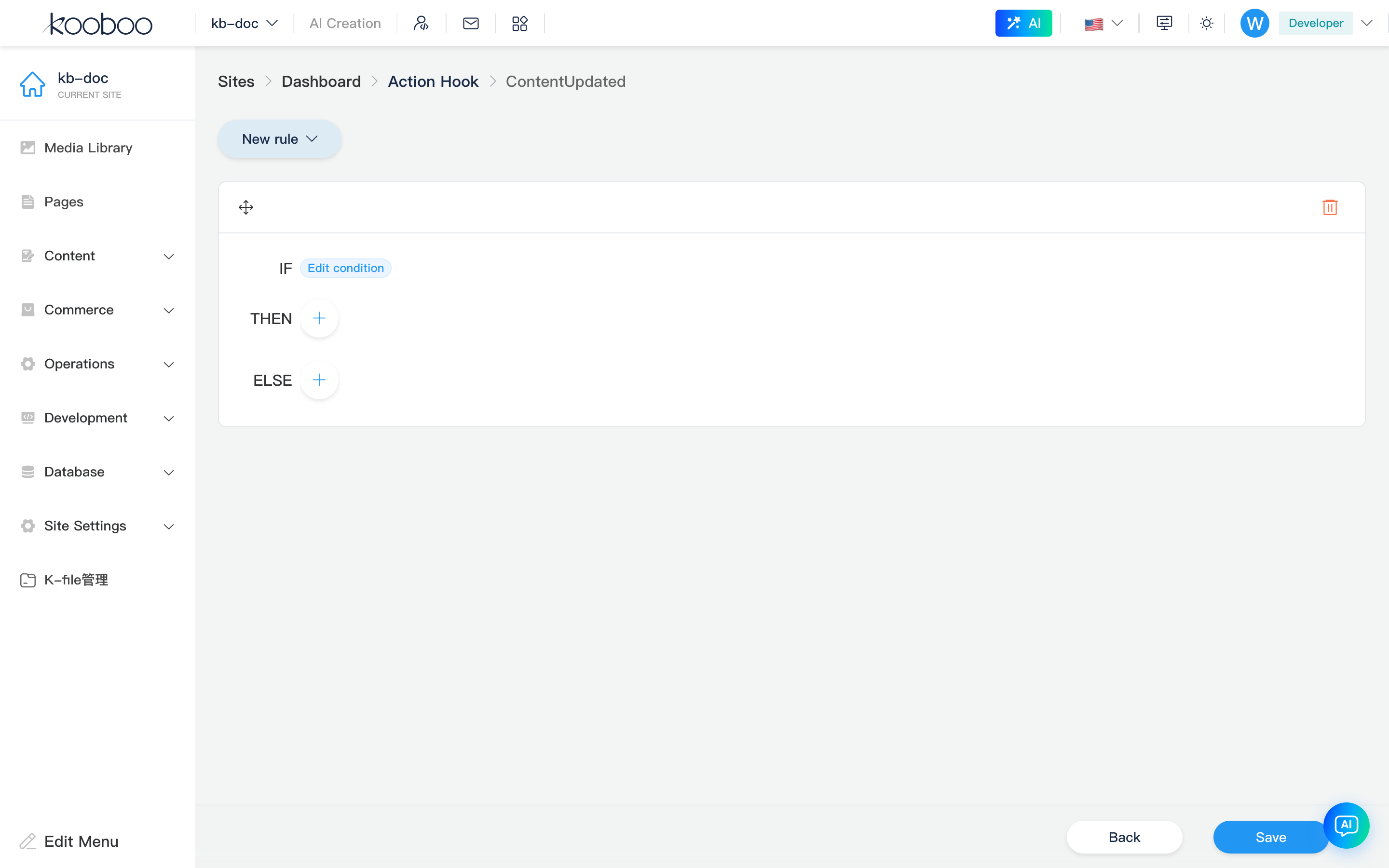
New Rule
New Rule dropdown on the toolbar:
| Type | Value | Structure |
|---|---|---|
| IF-ELSE-THEN | IF-ELSE-THEN | Condition IF + branches THEN / ELSE (nested rules allowed) |
| DO | DO | Run one or more Code blocks in sequence |
If there are no rules when you open the edit page, one IF-ELSE-THEN rule is added by default.
Rule Cards
- Drag handle on the card title bar to reorder rules for the same event.
- Delete on the title bar removes the whole rule.
IF-ELSE-THEN
| Area | Description |
|---|---|
| IF | Click the label to open condition editor; multiple conditions shown joined with && |
| THEN / ELSE | Nested rule lists; add more IF-ELSE-THEN or DO rules |
DO
Lists Code snippet summaries; + adds Code, pencil edits. Code is written in Monaco as KScript (language: typescript, KScript mode). See related links at the end for script objects and APIs.
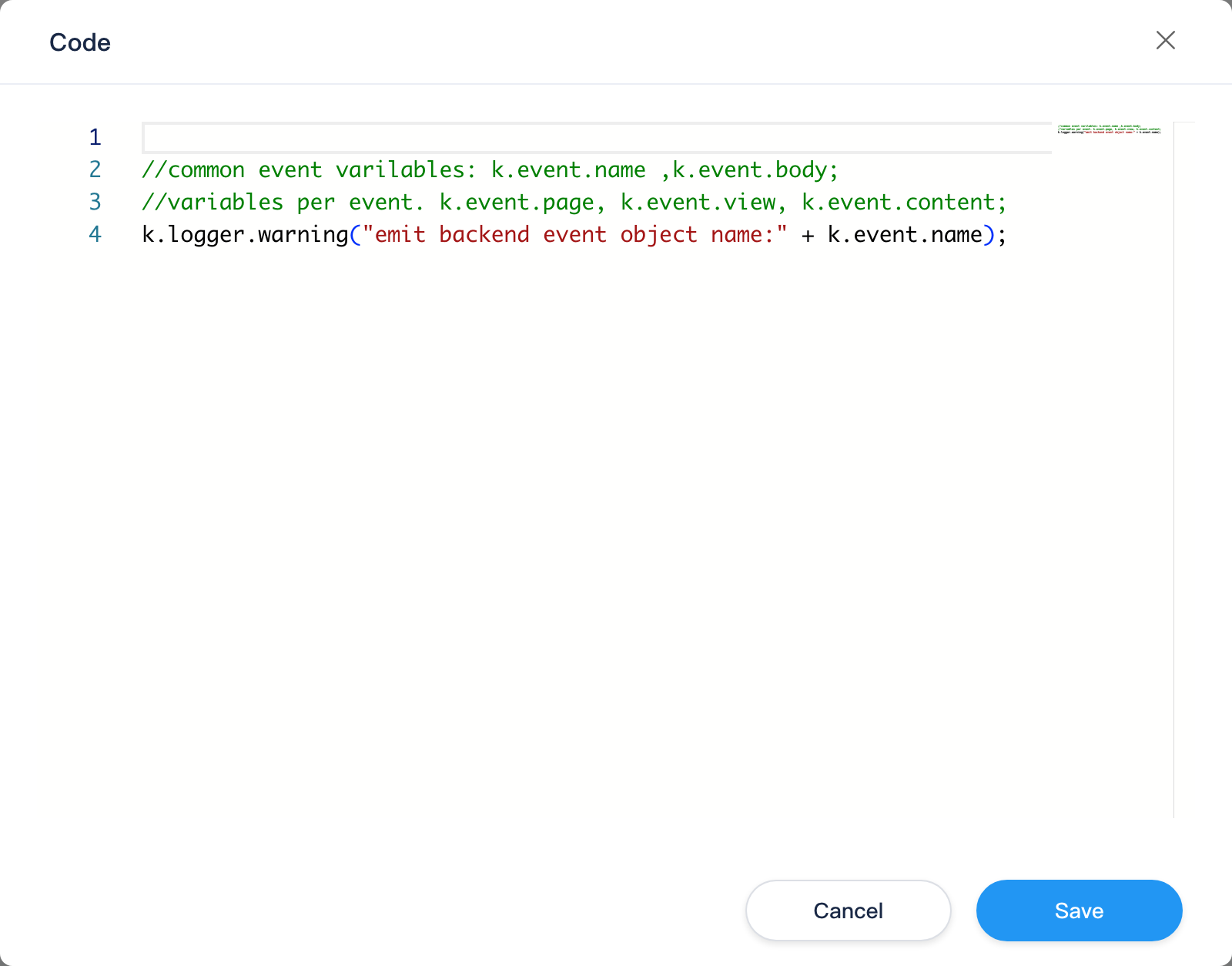
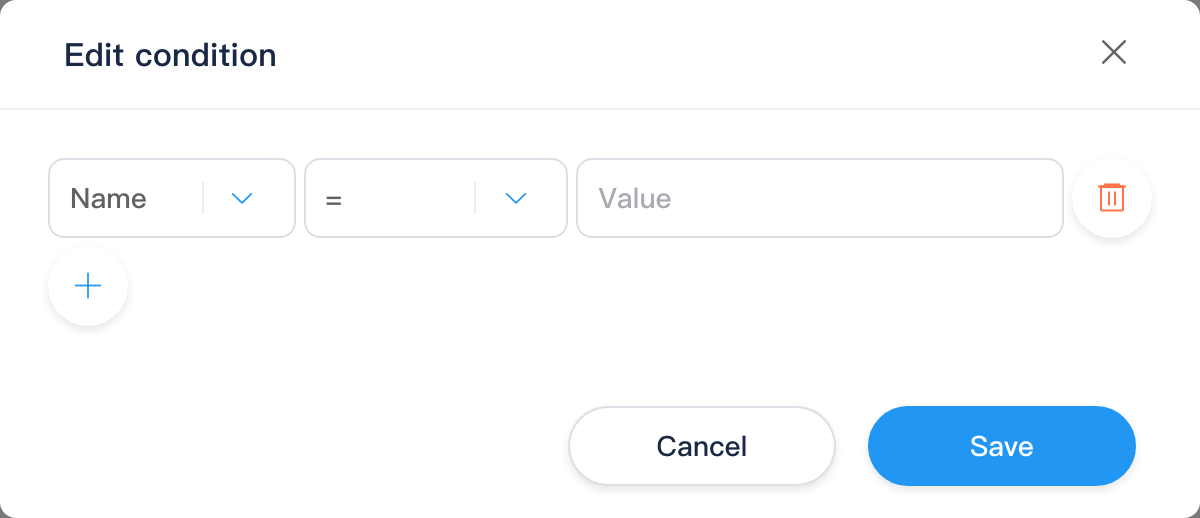
Edit Conditions
| Column | Description |
|---|---|
| Left value | Fields available for the current event (BackendRule/ConditionOption), e.g. resource Name, Body, Url, content FolderName, product Title, etc. |
| Operator | Varies by left-value type (e.g. =, !=, Contains, >, etc.) |
| Right value | Comparison constant |
Use + to add condition rows; confirm writes back to the rule if array. Evaluation runs at runtime via ConditionManager.Evaluate.
Save and Leave
Bottom KBottomBar: Back returns to the list; Save calls BackendRule/post (eventName + rules). Unsaved changes prompt before leaving (useSaveTip).
Execution Order (Concept)
- Site
enableBackendEventsis true. - A backend resource operation fires the matching BackendEvent (e.g.
PageCreating,ContentUpdated). - Rules for that event run in list order; IF-ELSE-THEN evaluates conditions then THEN/ELSE; DO runs Code in sequence.
Execution is handled by the site's backend action hook engine, in the order configured on this page.
Typical Workflow
- Confirm Advanced tab and Hook On on this page.
- New Hook → pick target resource and timing, e.g. ContentUpdated.
- Add IF-ELSE-THEN to filter resource fields, or DO for backend actions.
- Save, then create, update, or delete the resource in the admin to verify.
- On collaborative export, hooks map to BackendRule resources in the site package.
CMS vs API
| Scenario | CMS | API / Template Engine |
|---|---|---|
| Which backend operations trigger rules | This page: hook type picker and rule save | — |
| Script actions inside rules | Entry via Code dialog only | Development -> Code, k.site Code API |
| Content data after content save | Content events on this page | k.content |
| Commerce data after product/order events | Product / Order events on this page | k.commerce |
Related
| Doc | Description |
|---|---|
| Settings overview | Menu and sub-routes |
| Basic Settings · Advanced | enableBackendEvents |
| Request Hooks | Front-end request lifecycle events |
| Development -> Code | KScript code resource entry |
| Content API | Content read/write |
| Commerce API | Product, category, order APIs |