
Appearance
Product Types
Menu: Commerce -> Product Types
Deep link:/_Admin/commerce/product-types?SiteId={siteGuid}
Product types define an attribute template and variant option presets for a class of products (similar to Content -> Content Types defining entry structure, but product type "form fields" mainly come from product custom fields in settings, shared globally). Types also determine digital product download limits.
Required before products
Without types, product management Create product dropdown has no types besides "Blank product". Create at least one (e.g. physical, digital).
Product-level title, description, variant options are maintained on product detail; type stores the template; new products preload attributes and variant dimensions by selected typeId.
How to Open
- In the Edit menu, enable Commerce -> Product Types (and the parent Commerce group).
- Open Commerce -> Product Types in the left sidebar.
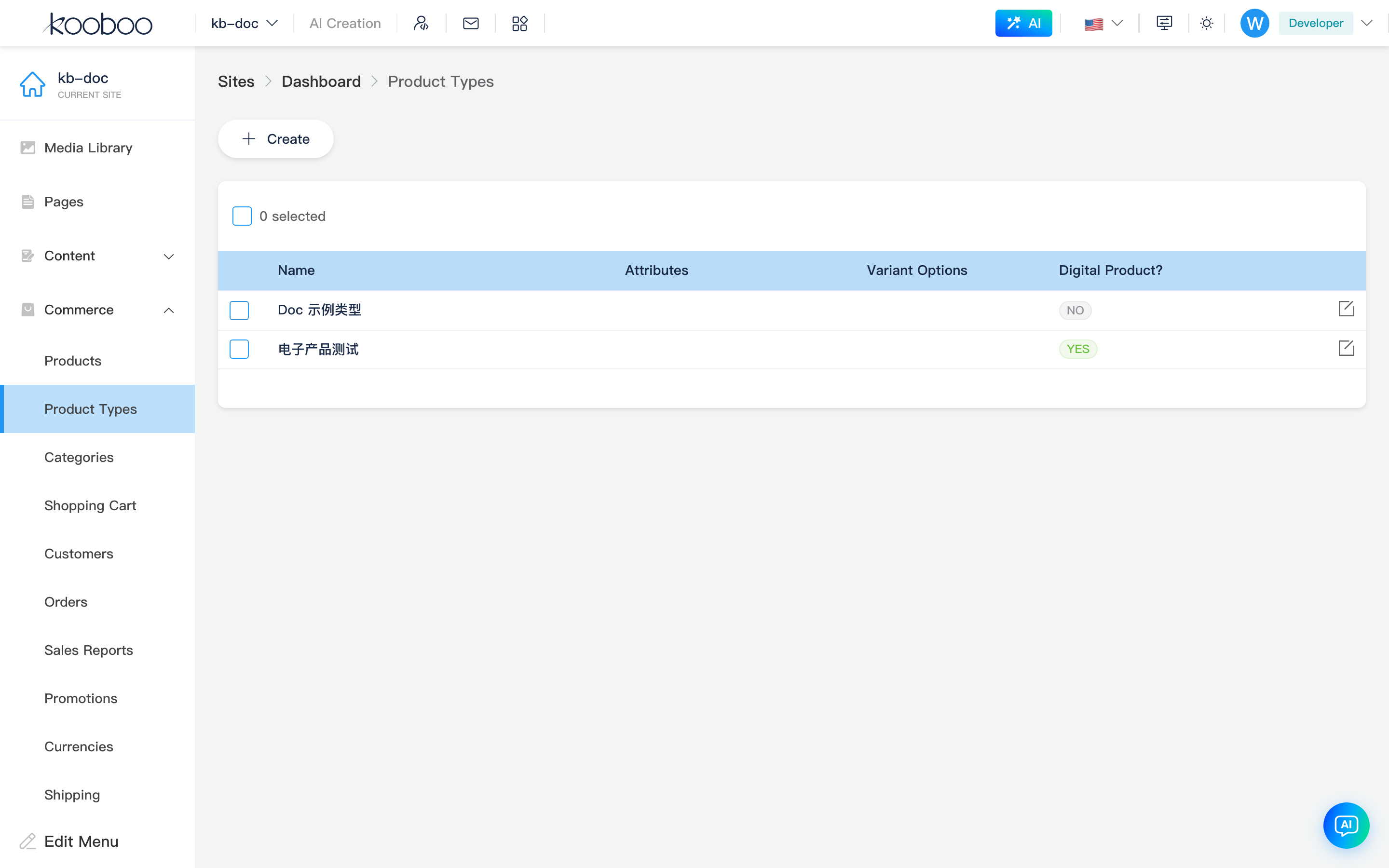
List Page
Path: /_Admin/commerce/product-types?SiteId=...
| Column / Action | Description |
|---|---|
| Name | Type identifier; shown in create product dropdown |
| Attributes | Preset attribute names (tag display). Shown only when settings has not enabled "Hide attributes" |
| Variant options | Preset variant dimension names (e.g. color, size). Shown only when Hide variants is not enabled |
| Digital product | Whether products default to digital (boolean) |
| Create | Opens Create dialog |
| Edit | Row pencil opens Edit dialog |
| Batch delete | Select rows → toolbar Delete → confirm |
Create / Edit Dialog
Create and edit share the same form (CreateDialog / EditDialog), titles Create and Edit.
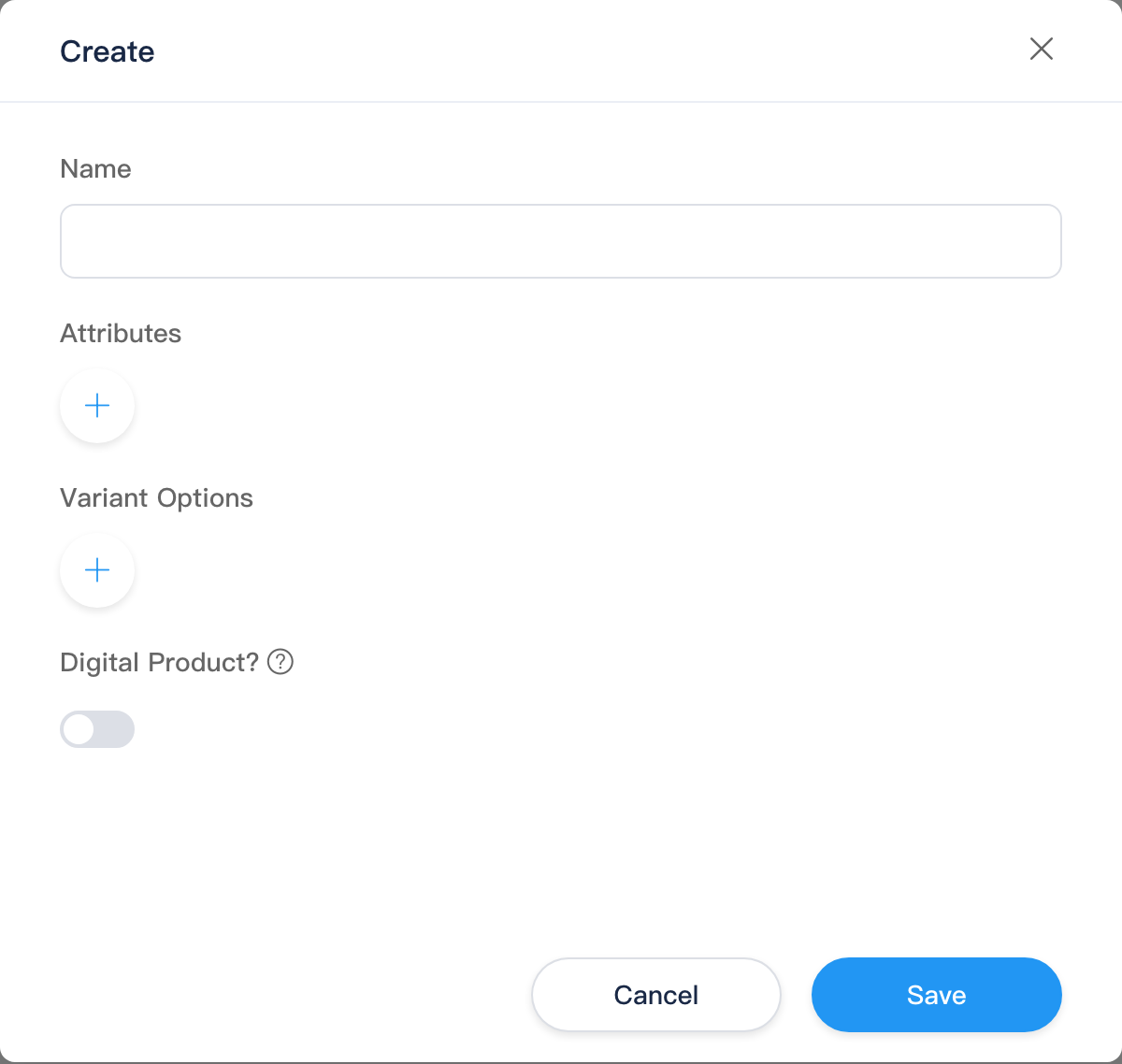
Name
Type name, required. After save, appears in product management Create product type list.
Attributes
Shown in create dialog when globally Hide attributes is off (edit dialog always shows).
Add rows via blue round +; click card to edit:
| Setting | Description |
|---|---|
| Name | Attribute name (e.g. Material); placeholder examples on UI |
| Type | Selection (Selection): maintain optional values; Custom (Custom): operator fills freely on product detail, no preset list |
| Values | Selection only: add/remove candidate values (text input, Enter or Tab to append) |
After saving type, new product with typeId injects into basic info Attributes key-value editor: selection attributes get dropdown candidates, custom attributes empty for fill-in.
Variant Options
Shown in create dialog when globally Hide variants is off (edit dialog always shows).
Also use + to add variant option cards (TermEditor + forceSelection):
| Setting | Description |
|---|---|
| Name | Dimension name (e.g. Color, Size) |
| Type | Right dropdown: Text or Color (same as product detail variant options) |
| Option values | Preset values for dimension (e.g. Red, Blue); after saving type, new product auto-generates corresponding variant row combinations |
Product detail can still add/remove option values and variants; type provides initial variant skeleton; see product detail -> variant options.
Digital Products
| Item | Description |
|---|---|
| Digital product toggle | When checked, products of this type default isDigital = true; must configure digital product delivery per variant on product detail (three add methods in that section) |
| Limit download count | Optional; check then enter cap |
| Limit download days | Optional; check then enter days valid from purchase |
See UI Tooltip for hint text.
Relationship with Product Detail
(typeId brings attribute/variant presets on create; field definitions from settings; see table below.)
| Source | What enters product detail |
|---|---|
| Product type | Attribute template, variant dimensions and preset values, digital product default |
| Settings | System fields (title/SEO/image, etc.) and custom field definitions |
| Operator input | Specific title, price, stock, variant images, etc. |
Blank product (no typeId) loads no type template; only global custom fields and empty variant area.
Comparison with Content Module
| Content | Commerce |
|---|---|
| Content type | Product type |
| Field definition page | (Product fields in Settings -> Product custom fields, not in type dialog) |
| Content entry | Each product in product management |
Related
- Product management (list)
- Product detail (create and edit)
- Settings — hide attributes/variants, product custom fields
- k.commerce