
Appearance
Content Folder Settings
Open from row Settings (gear) or the New wizard on the content folder list
Dialog title is usually Settings, with three tabs: Basic, Related data, Fields
Configure content folder metadata, associations with other content folders, and field display order for admin entry/list UIs. Not used to fill specific field values for one entry (that is on the content entry edit page).
Prerequisite
A content type must exist. Related data can only target other folder-type content folders (not single content folders).
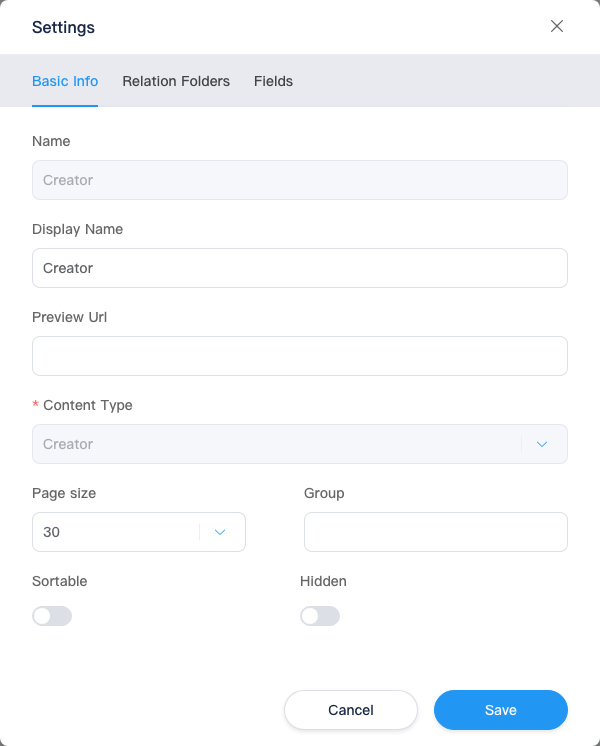
Basic
| Setting | Description |
|---|---|
| Name | Content folder identifier; {name} in k.content.{name}; usually cannot change after create |
| Display name | Name shown in the admin |
| Preview URL | Optional; used by content entry Save and preview, etc. |
| Content type | Binds a content type; usually cannot change after save |
| Page size | Folder only: entries per page; can choose Disable pagination |
| Group | Collapse with other folders in the content folder list |
| Sortable | Whether manual entry ordering is allowed |
| Sort field | When enabled: sort by a field asc/desc, or drag-and-drop order |
| Hidden | Hide from the content folder list (use Show all to view) |
Single content folders omit pagination and other list-related items; follow the UI.
Related Data
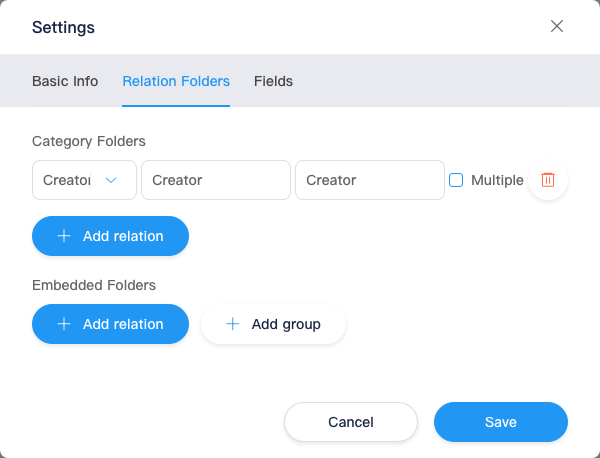
Attach data from other content folders to each entry in this folder for admin entry and front-end k.content reads. Two kinds:
| Type | Admin label | Data relationship | Typical use |
|---|---|---|---|
| Category data | Category data | Current entry “belongs to” entries in the related folder (tag/category style, many-to-many) | Article belongs to multiple tags; product in categories |
| Embedded data | Embedded data | Pick and embed specific entries from the related folder on the current entry (stores Id list) | Recommended products on an article, carousel items |
Both require:
| Item | Description |
|---|---|
| Target content folder | Select another folder-type content folder in the site |
| Alias | Key in API and templates; must be unique; English recommended |
| Display name | Section title on the admin form |
| Multiple | Category data only: allow multi-select associations |
Embedded data can add groups: multiple related folders in one group; group name is for admin display; aliases are configured per folder in the group.
Category data vs embedded data (how to choose)
| Question | Prefer |
|---|---|
| Relation set defined by “which categories/tags this entry belongs to” | Category data |
| Relation set is a manually picked fixed set of entries at edit time | Embedded data |
| Need multiple related folders in one block | Embedded data + groups |
Reading Related Data in k.content
Get the current entry first (.get() for folders; direct k.content.{folderName} for single-content folders), then access by configured alias.
Category data (alias example tags)
typescript
const post = k.content.Article.get('2024-launch')

// Alias tags: array of related folder entries linked to this article
const tagItems = post.tags  // equivalent to KCategory.All()

for (const tag of tagItems) {
  k.console.log(tag.title)
}
Embedded data (alias example relatedProducts)
typescript
const post = k.content.Article.get('2024-launch')

// Alias relatedProducts: array of embedded product entries on this article
const products = post.relatedProducts  // equivalent to KEmbeddedFolder.All()

for (const p of products) {
  k.console.log(p.title)
}
relatedContent (by name)
You can also use relatedContent on the entry and call get by alias:
typescript
const post = k.content.Article.get('2024-launch')
const gallery = post.relatedContent.get('sideGallery')
Unconfigured aliases return null / empty. Exact return types and offline entries: k.content and runtime behavior.
With k-data
Listing main folder entries on list pages often uses k-data; related blocks on detail pages are usually rendered after get on a single entry and reading aliases in KScript.
Fields
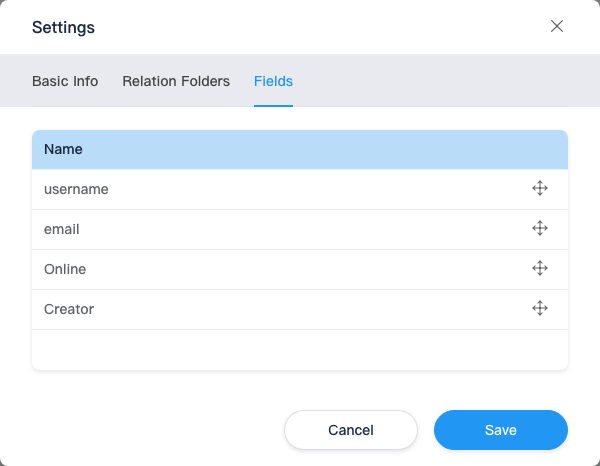
Controls display order of editable fields + related sections on the content entry edit page and related UIs (drag to reorder).
| Source | Description |
|---|---|
| Fields marked user-editable in the content type | From the type bound to this folder |
| Configured category/embedded relations | Appear by alias or display name |
Affects admin display order only; field definitions remain in content types.
On save, if Basic or Related data validation fails, the dialog switches to the corresponding tab.
Related
| Doc | Description |
|---|---|
| Content folders | Create folder / single content |
| Content entries | Enter relations and field values |
| k.content | API reference |