
Appearance
Edit Code
Open from Pages row Edit Code (design pages use Design)
Deep link (HTML page):/_Admin/page/edit?SiteId={siteGuid}&id={pageId}
Layout page:/_Admin/page/layout-edit?SiteId=...&id=...&layoutId={layoutId}
New HTML page:/_Admin/page/edit?SiteId=...(noid; saving writesid)
Use the full-screen Monaco editor to edit the Page body (HTML source). It supports KScript hints, formatting, and code references.
Page types
| Type | This page route |
|---|---|
| HTML page | page-edit |
| Layout page | layout-page-edit |
| Design page (Designer) | page-design / layout-page-design (visual, not Monaco) |
| Rich text page | rich-page-edit (rich text, not this article) |
How to open
- Pages list -> target row -> Edit Code (
</>icon). - When creating a new HTML page, the creation wizard also takes you here (first fill in the name and URL).
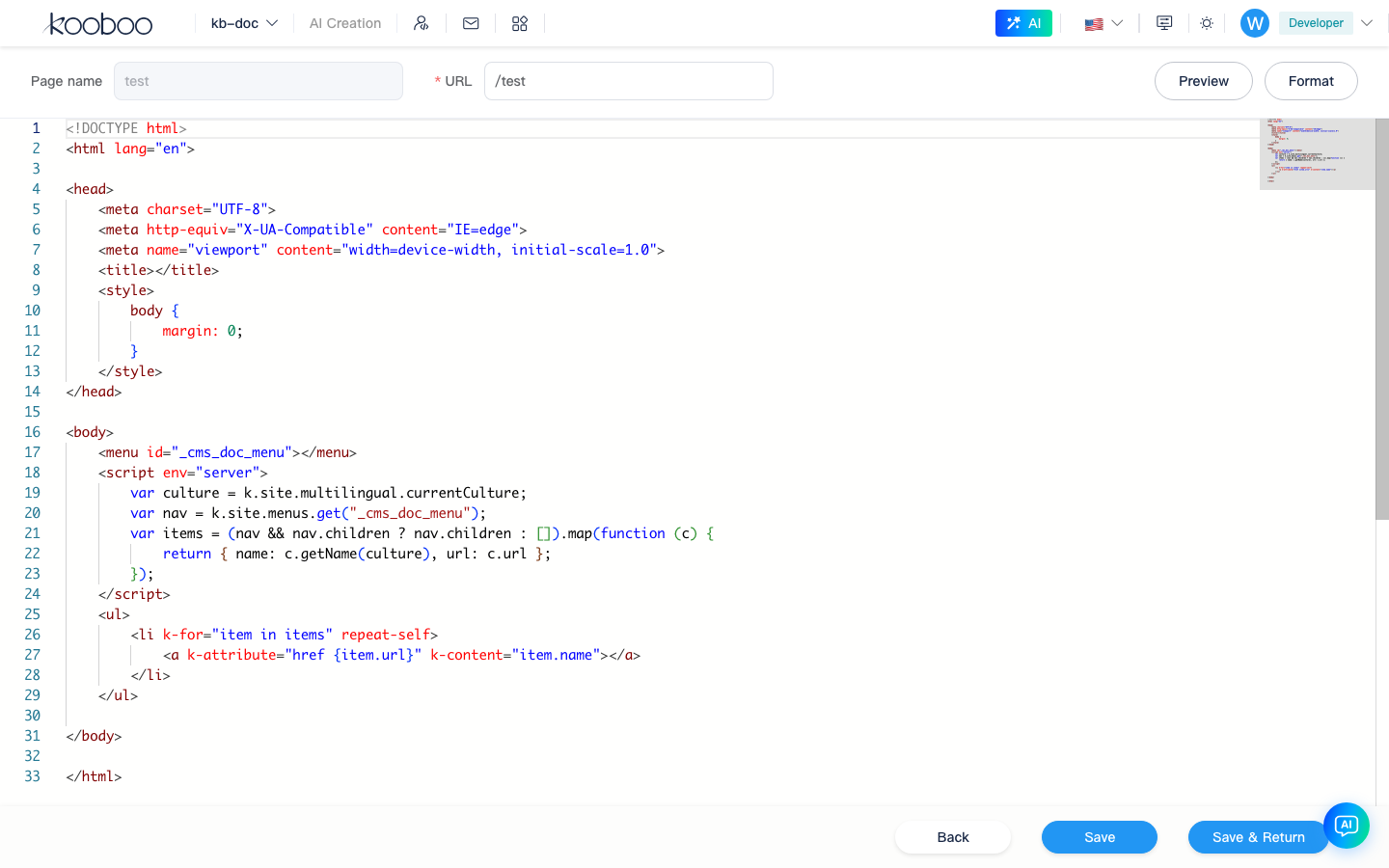
Interface
| Area | Description |
|---|---|
| Top-left header | Page name, URL (the name is editable when creating; existing page names are usually locked) |
| Top-right header | Preview (front-end address), Format (organize HTML) |
| Middle | Code editor, language="html", supports k-script and code references (saved pages) |
| Bottom bar | Back, Save, Save and Back |
Shortcut keys for Save are the same as the rest of the system's editors (subject to Kooboo backend shortcut settings).
Saving behavior
- Validates name (new) and URL uniqueness.
- After saving successfully, writes the site Page resource; after creating one, the address bar is replaced with
page-editincludingidto avoid duplicate creation. - If you leave without saving, a prompt appears (except on the login page).
What to write
HTML pages
You can write a complete page, or use Layout syntax:
html
<layout id="main">
  <placeholder id="Main">
    <h1>About Us</h1>
  </placeholder>
</layout>
See Template Engine · Page and Layout.
Layout pages
The editor maintains the content of each Layout placeholder on this page (different from the Layout resource itself; the Layout body lives under Development -> Layouts).
Preview
The top-bar Preview opens the current previewUrl (the same as the list's Preview column). After changing code, you must Save before previewing to see the latest body.
Relation to Settings and Inline Edit
| Action | Location |
|---|---|
Change urlPath, publish, Meta, and this page's Style/Script list | Page settings |
| Change body HTML | This page |
| Click DOM to change copy/images/links | Inline edit |
Use this page for large structural adjustments; operational fine-tuning can use inline edit. Both modify the same Page resource.
Related
| Doc | Description |
|---|---|
| k.site.pages | Script add / updateBody, etc. |
| View | <view id="..."> |
| Media library | Image paths |